





So, you’ve just unboxed a brand-new hoverboard, or perhaps you’re planning a day of cruising around the neighborhood. The excitement is real, but then the battery light flashes red. Naturally, the first question on your mind is: How long does it take for a hoverboard to charge?
Waiting for your board to juice up can feel like watching paint dry, especially when you’re eager to ride. In this comprehensive guide, we’ll break down the charging times for various models, the factors that influence battery speed, and professional tips to keep your board’s "heart" beating longer.
The Short Answer: Average Charging Times
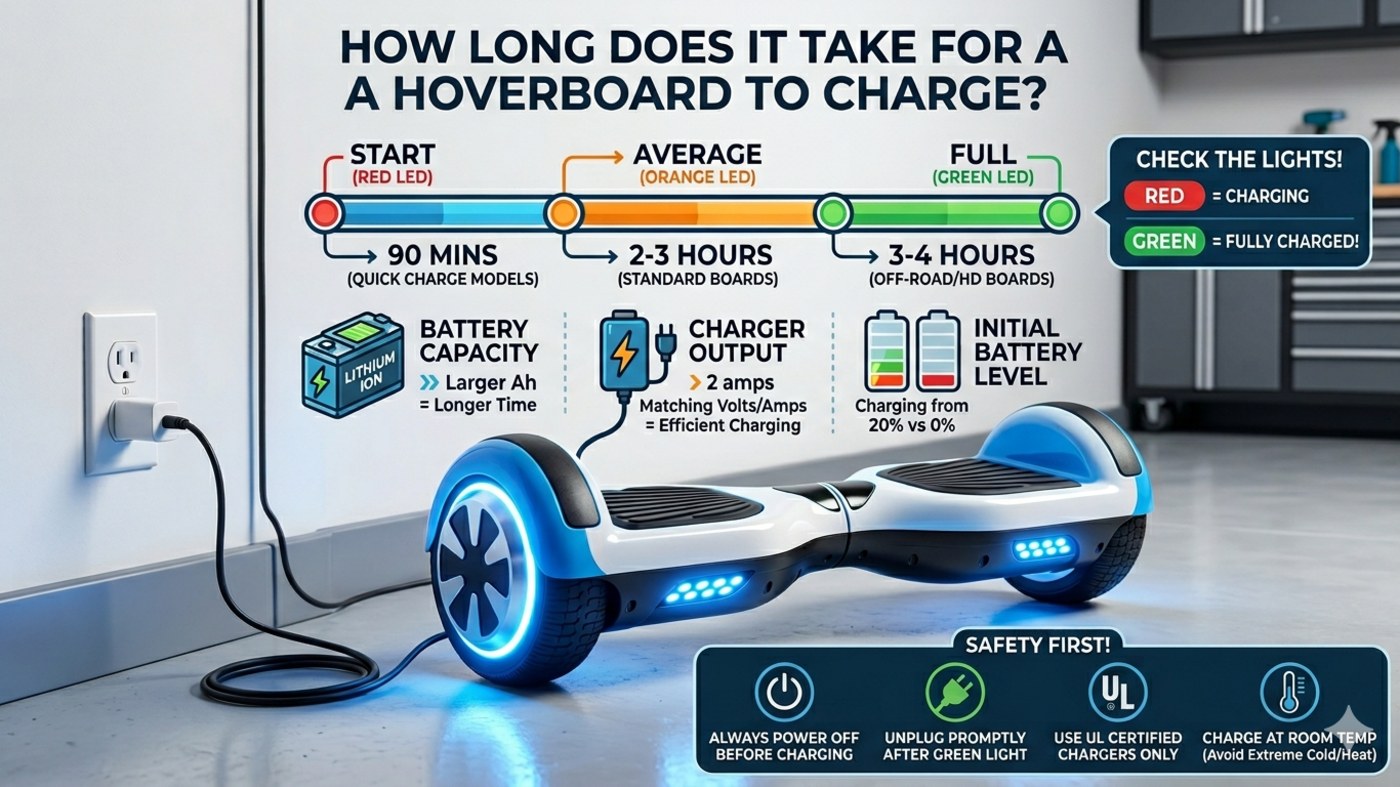
Generally speaking, most modern hoverboards take anywhere from 2 to 4 hours to reach a full charge.
However, "average" doesn't always apply to every board. Depending on the brand, the battery capacity, and the type of hoverboard charger you are using, you might find yourself back on the pavement in 90 minutes, or waiting upwards of 5 hours.
-
Standard Models: 2–3 hours
-
Off-Road/Heavy Duty Models: 3–5 hours
-
Budget/Entry-Level Models: 2–4 hours
Why Does Charging Time Vary?
If you’re wondering exactly how long do hoverboard take to charge in your specific case, you have to look at the technical "ingredients." Several factors play a role in how fast those electrons move:
1. Battery Capacity (Ah)
Think of the battery like a fuel tank. A larger tank takes longer to fill. Most hoverboard use Lithium-ion batteries measured in Amp-hours (Ah). A 4.4Ah battery is standard; if your board has a larger capacity for longer range, it will naturally take longer to charge.
2. The Charger’s Output
Not all chargers are created equal. Most hoverboard chargers output at 2 Amps. If you use a lower-output charger (which we don't recommend), the process will slow down significantly.
3. Current Battery Level
It sounds obvious, but charging from 50% is much faster than charging from a completely "dead" state. However, as we’ll discuss later, letting your board hit 0% frequently isn't great for its long-term health.
How to Know When Your hoverboard is Fully Charged
You don't need a stopwatch to figure out how long does it take to charge a hoverboard. Most manufacturers have built-in visual cues:
-
The Charger Light: This is your most reliable indicator. Almost all chargers have an LED indicator. Red means it is currently drawing power, and Green means the battery is full.
-
The Board’s Indicator: Some hoverboard have a battery icon on the chassis that flashes or changes color.
Pro Tip: Once the light turns green, it’s best to unplug it within 30 minutes. Overcharging can lead to "battery memory" issues or, in rare cases, overheating.
Step-by-Step: The Correct Way to Charge Your Hoverboard
To ensure safety and efficiency, follow these professional steps every time you plug in:
-
Power Down: Always turn your hoverboard OFF before charging. Charging while the board is on can confuse the battery management system (BMS).
-
Dry Connections: Ensure the charging port and the cable are completely dry. Even a tiny bit of moisture can cause a short circuit.
-
Plug Sequence: Plug the charger into the wall outlet first (ensure the green light is on), then connect it to the hoverboard.
-
Align the Pins: hoverboard charging ports have a specific "groove" or Hboard charger 3-pin alignment. Never force the plug; if it doesn't slide in easily, check the orientation.
-
Monitor: Avoid leaving the board charging overnight while you sleep. While modern UL 2272 certified boards are very safe, it’s always best practice to be nearby.
Common Charging Issues and Troubleshooting
Sometimes, you’ve waited the standard 3 hours, but something is wrong. Here are the most common hurdles:
-
The Light Stays Green Immediately: If you plug in a dead board and the light stays green, you might have a faulty charger or a "tripped" battery that needs a reset.
-
The hoverboard Won't Turn On After Charging: This often indicates a battery that can no longer hold a charge, or a loose internal connection.
-
The Charger is Getting Very Hot: A little warmth is normal, but if it's too hot to touch, unplug it immediately. This could be a sign of a cheap, non-certified charger.
5 Professional Tips to Make Your Battery Last Longer
Knowing how long does it take for a hoverboard to charge is half the battle; the other half is maintaining that battery so you don't have to replace it every six months.
-
Don't Let it Hit Zero: Lithium-ion batteries hate being completely depleted. Try to plug it in when it hits about 10–20%.
-
The "Storage" Charge: If you aren't going to ride for a month, don't store the board empty. Charge it to about 50–70% before putting it away.
-
Avoid Extreme Temperatures: Don't charge your board in a freezing garage or under direct, blistering sunlight. Room temperature is the "Goldilocks" zone for charging.
-
Use the Original Charger: It might be tempting to buy a cheap replacement online, but ensuring the voltage and amperage match perfectly is vital for safety.
-
Look for UL 2272 Certification: If you are buying a new board, ensure it has this safety rating. It means the battery and charging system have been rigorously tested for fire safety.
Summary: Back to the Streets
To recap, if someone asks you how long do hoverboard take to charge, you can confidently tell them to expect a 2 to 4-hour window.
By following the proper charging sequence and keeping an eye on that LED indicator, you ensure that your rides stay long and your battery stays healthy. Don't rush the process—good energy takes time!